Memo

共 8 条

通过 SSH 迁移 btrfs volumes

配置 SSH 免密:

ssh-copy-id -i ~/.ssh/id_ed25519.pub <user>@<host>

在目标端配置 sudo 免密:

https://serverfault.com/questions/160581/how-to-setup-passwordless-sudo-on-linux

%wheel ALL=(ALL:ALL) NOPASSWD: ALL

The key is to add it after the last line which says

#includedir /etc/sudoers.d

创建快照:

# sudo btrfs subvolume snapshot -r <fs-path> <snapshot-path>
sudo btrfs subvolume snapshot -r / /sysfs_ro

发送:

sudo pacman -S pv
# sudo btrfs send <snapshot-path> | pv | ssh <target-machine> "sudo btrfs receive <target-fs-path>"
sudo btrfs send /sysfs_ro | pv | ssh target-host "sudo btrfs receive /mnt/arc"

# 发送完成后,路径是 /mnt/arc/sysfs_ro

通过 SSH 迁移 docker images

需要安装好:

  • pv
  • zstd

把命令中的 ssh <user>@<host> 替换成目标端:

docker images --format "{{.Repository}}:{{.Tag}}" | grep -v 'none' \
| xargs -I{} bash -c \
"docker save {} | zstd -T0 --fast | pv | ssh <user>@<host> 'zstd -d | docker load'"

关闭 macOS 监听的端口 5000

我很喜欢 sigoden/dufs 这个项目,启动一个 HTTP server 还是共享文件,都非常方便。

但是 macOS 下会有一个烦人的家伙占用 5000 端口。

-> % dufs
Error: Failed to bind `0.0.0.0:5000`

Caused by:
    Address already in use (os error 48)

抓一下。

-> % sudo lsof -i -P | grep ":5000"
ControlCe   629        fanyang   12u  IPv4 0xdc924348e03ccb2f      0t0    TCP *:5000 (LISTEN)
ControlCe   629        fanyang   13u  IPv6 0xcb88b5ec8a71ad1a      0t0    TCP *:5000 (LISTEN)

好家伙,原来是 Control Center。这就把你干了。

Why always something is running at port 5000 on my mac

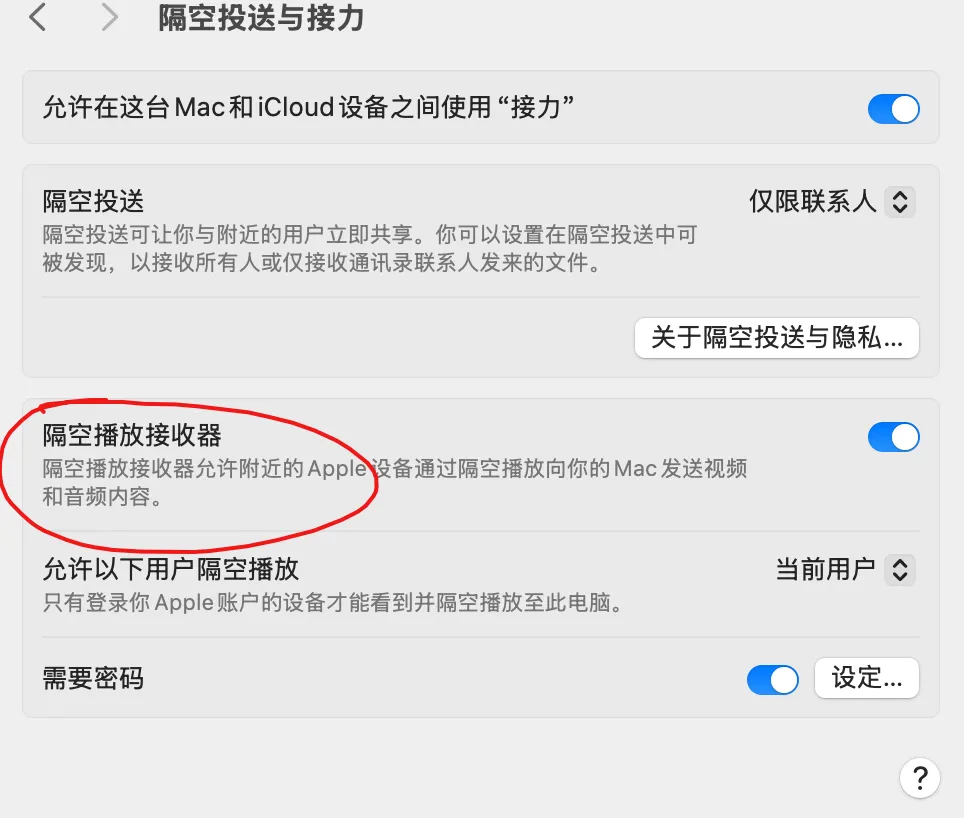
For fixing this you need to turn off System Settings > General > AirDrop & Handoff > AirPlay Receiver.

image.png

嗯,确实没了,很好。

把 ArchLinux 当成无线路由器用

刚进货一台新服务器,有两个有线网口,只有四个 PCIe,插一个无线网卡太浪费。那么就让他走到另一台有无线网卡的机器上网吧!

sudo pacman -S nftables
-> % cat /etc/nftables.conf
#!/usr/bin/nft -f
# vim:set ts=2 sw=2 et:

# IPv4/IPv6 Simple & Safe firewall ruleset.
# More examples in /usr/share/nftables/ and /usr/share/doc/nftables/examples/.

destroy table inet filter
table inet filter {
  chain input {
    type filter hook input priority 0; policy drop;

    ct state invalid drop comment "early drop of invalid connections"
    ct state {established, related} accept comment "allow tracked connections"
    iif lo accept comment "allow from loopback"
    ip protocol icmp accept comment "allow icmp"
    meta l4proto ipv6-icmp accept comment "allow icmp v6"
    tcp dport ssh accept comment "allow sshd"
    pkttype host limit rate 5/second counter reject with icmpx type admin-prohibited
    counter
  }

  chain forward {
    type filter hook forward priority 0; policy drop;
    iifname "enp2s0" oifname "wlo1" accept
    ct state established,related accept
  }

  chain output {
        type filter hook output priority 0; policy accept;
  }
}

table ip nat {
    chain prerouting {
        type nat hook prerouting priority 0; policy accept;
    }

    chain postrouting {
        type nat hook postrouting priority 100; policy accept;
        oifname "wlo1" masquerade
    }
}
-> % sudo systemctl enable --now nftables.service
-> % cat /etc/sysctl.d/30-ipforward.conf
net.ipv4.ip_forward=1

-> % sudo sysctl --system

二分查找路径 MTU

从以太网 MTU 1500 对应的 1472 字节负载开始,按结果调整:

ping -M do -s 1472 -c 1 <ip>

理解 Nginx 499 与客户端超时

若 Nginx 的 upstream 超时为 60 秒,而客户端请求超时为 15 秒,处理超过 15 秒的请求会先被客户端断开。Nginx 尚未达到 504 的判定阈值,因此记录为 499。

排查时应同时核对客户端、代理和 upstream 的超时配置。

使用 nftables 模拟丢包

丢弃目标端口的入站 TCP 流量:

sudo nft create table ip filter
sudo nft add chain ip filter input { type filter hook input priority 0 \; }
sudo nft add rule ip filter input tcp dport 3888 counter drop

恢复前先查看 handle,再删除对应规则:

sudo nft list chain ip filter input
sudo nft delete rule ip filter input handle n