文章/memory-capacity-and-bandwidth-map
1 分钟阅读
容量和带宽关系图
用对数坐标比较 CPU、GPU 和 SSD 的容量与带宽。
SunnyCase 发了一张很好的图,揭示了带宽和容量的关系。
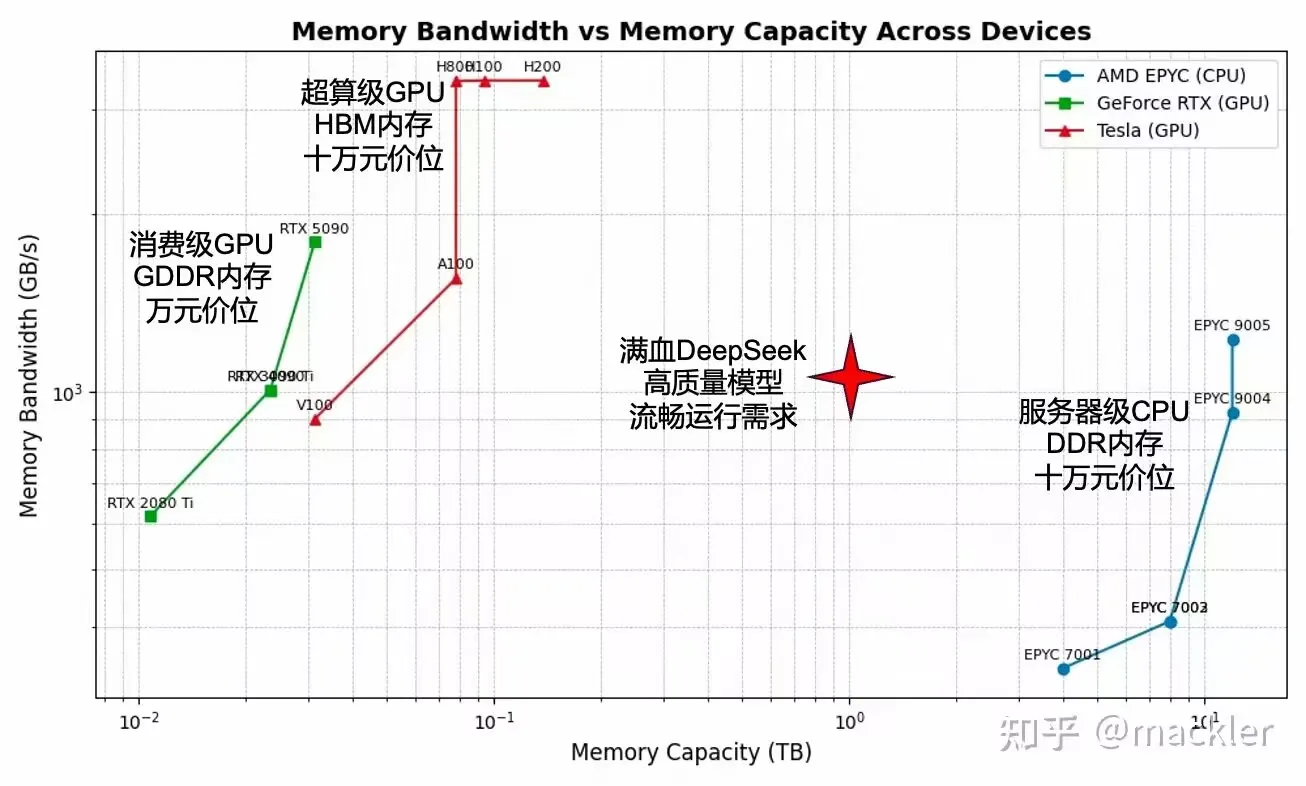
如果这上面有 SSD 就更好了,他说。于是便有了下图:
本人根据网上内容对数据进行了校对。
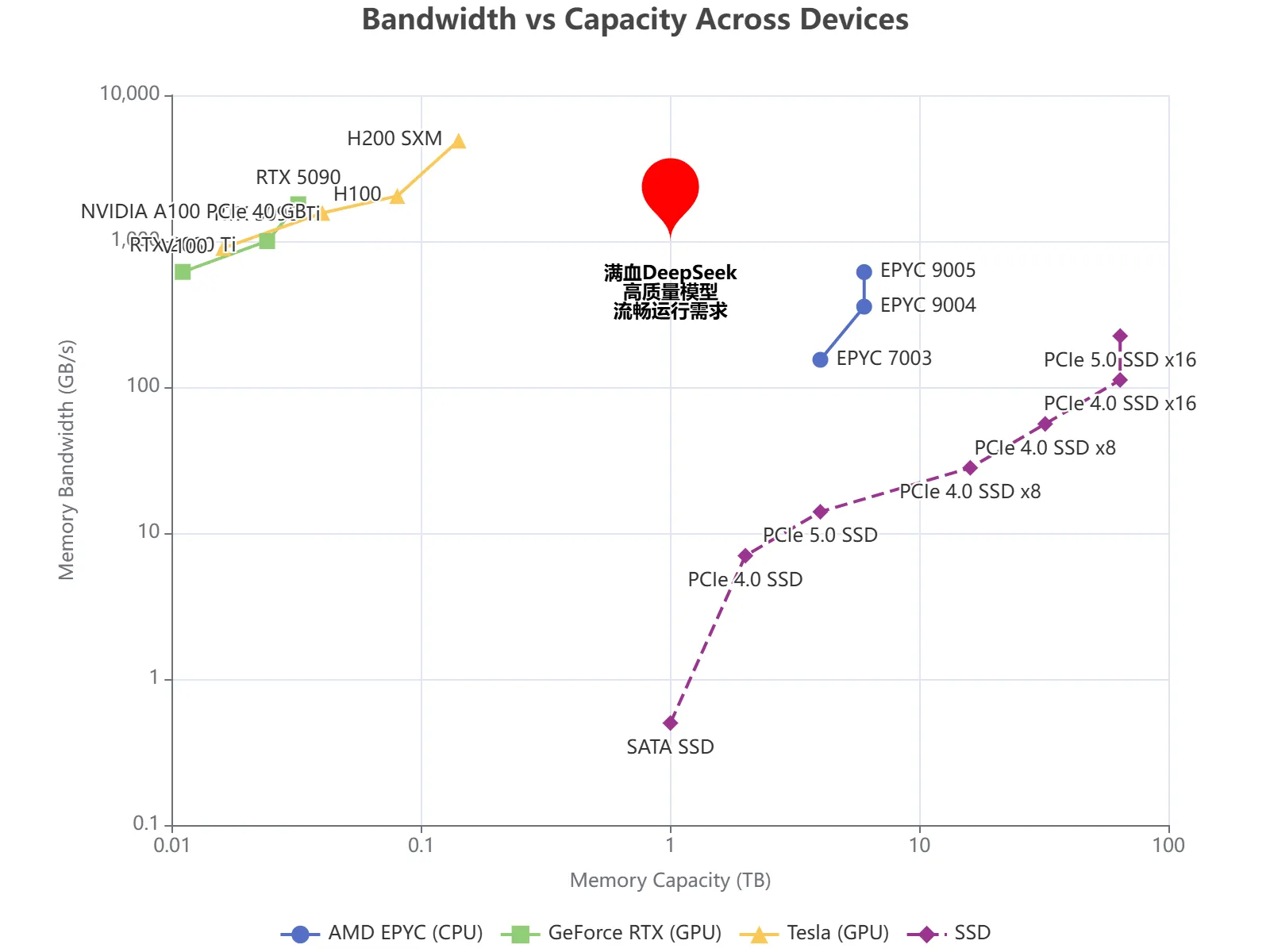
附代码:
<!DOCTYPE html>
<html lang="en">
  <head>
    <meta charset="UTF-8" />
    <title>Memory Bandwidth vs Capacity</title>
    <script src="https://cdn.jsdelivr.net/npm/echarts@5.4.3/dist/echarts.min.js"></script>
  </head>

  <body>
    <div id="main" style="width: 800px; height: 600px"></div>
    <script type="text/javascript">
      var myChart = echarts.init(document.getElementById("main"));

      var option = {
        title: {
          text: "Bandwidth vs Capacity Across Devices",
          left: "center",
        },
        tooltip: {
          trigger: "item",
          formatter: function (params) {
            if (params.seriesName === "Annotations") {
              return params.data.value;
            }
            return (
              `<strong>${params.seriesName}</strong><br/>` +
              `型号: ${params.name}<br/>` +
              `容量 (TB): ${params.value[0]}<br/>` +
              `带宽 (GB/s): ${params.value[1]}`
            );
          },
        },
        legend: {
          top: "bottom",
          data: [
            "AMD EPYC (CPU)",
            "GeForce RTX (GPU)",
            "Tesla (GPU)",
            "SSD",
          ],
        },
        grid: {
          left: "8%",
          right: "8%",
          bottom: "10%",
          containLabel: true,
        },
        xAxis: {
          type: "log",
          name: "Memory Capacity (TB)",
          nameLocation: "middle",
          nameGap: 30,
          logBase: 10,
          // min: 0.01,
          // max: 20,
        },
        yAxis: {
          type: "log",
          name: "Memory Bandwidth (GB/s)",
          nameLocation: "middle",
          nameGap: 60,
          logBase: 10,
          // min: 10,
        },
        series: [
          {
            name: "AMD EPYC (CPU)",
            type: "line",
            symbol: "circle",
            symbolSize: 10,
            label: {
              show: true,
              position: "right",
              formatter: "{b}",
            },
            data: [
              { name: "EPYC 7003", value: [4, 154] },
              { name: "EPYC 9004", value: [6, 356] },
              { name: "EPYC 9005", value: [6, 614] },
            ],
            markPoint: {
              symbolSize: 80,
              data: [
                {
                  name: "DeepSeek需求",
                  value: "满血DeepSeek\n高质量模型\n流畅运行需求",
                  coord: [1, 1000],
                  // symbol: "star",
                  symbolSize: 60,
                  itemStyle: {
                    color: "red",
                  },
                  label: {
                    show: true,
                    position: "bottom",
                    distance: 15,
                    color: "#000",
                    fontWeight: "bold",
                  },
                },
              ],
            },
          },
          {
            name: "GeForce RTX (GPU)",
            type: "line",
            symbol: "rect",
            symbolSize: 10,
            label: {
              show: true,
              position: "top",
              formatter: "{b}",
            },
            data: [
              // https://www.techpowerup.com/gpu-specs/geforce-rtx-2080-ti.c3305
              { name: "RTX 2080 Ti", value: [0.011, 616] },
              // https://www.techpowerup.com/gpu-specs/geforce-rtx-3090-ti.c3829
              { name: "RTX 3090 Ti", value: [0.024, 1001] },
              // https://www.techpowerup.com/gpu-specs/geforce-rtx-5090.c4216
              { name: "RTX 5090", value: [0.032, 1790] },
            ],
          },
          {
            name: "Tesla (GPU)",
            type: "line",
            symbol: "triangle",
            symbolSize: 10,
            label: {
              show: true,
              position: "left",
              formatter: "{b}",
            },
            data: [
              // https://www.techpowerup.com/gpu-specs/tesla-v100-pcie-16-gb.c2957
              { name: "V100", value: [0.016, 897] },
              // https://www.techpowerup.com/gpu-specs/a100-pcie-40-gb.c3623
              { name: "NVIDIA A100 PCIe 40 GB", value: [0.04, 1560] },
              // https://www.techpowerup.com/gpu-specs/h100-pcie-80-gb.c3899
              { name: "H100", value: [0.08, 2040] },
              // https://www.techpowerup.com/gpu-specs/h200-sxm-141-gb.c4255
              { name: "H200 SXM", value: [0.141, 4890] },
            ],
          },
          {
            name: "SSD",
            type: "line",
            symbol: "diamond",
            symbolSize: 10,
            color: "#9A348E", // 紫色
            lineStyle: {
              type: "dashed",
            },
            label: {
              show: true,
              position: "bottom",
              formatter: "{b}",
            },
            data: [
              { name: "SATA SSD", value: [1, 0.5] },
              { name: "PCIe 4.0 SSD", value: [2, 7] },
              { name: "PCIe 5.0 SSD", value: [4, 14] },
              { name: "PCIe 4.0 SSD x8", value: [4*4, 7*4] },
              { name: "PCIe 4.0 SSD x8", value: [4*8, 7*8] },
              { name: "PCIe 4.0 SSD x16", value: [4*16, 7*16] },
              { name: "PCIe 5.0 SSD x16", value: [4*16, 14*16] },
            ],
          },
        ],
      };
      myChart.setOption(option);
    </script>
  </body>
</html>
讨论
邮箱用于身份识别和回复通知,并由 Waline 存储。